Tap Talk and the mic stays open. Hold Talk and it drops when you let go.
Disbrow Productions, LLC
Production intercom, anywhere.
A soft panel for the booth: square Talk, Listen, and Call keys in the browser or on a phone, and Stream Deck through Bitfocus Companion. No copper party line required.
Running a show, or on the crew? Log in · One-off? Join with a PIN
Panel demoNo audio
Tap Talk to latch. Hold Talk for a moment.
Program
Production
Cams
GuestListen only
Production and Cams can talk. Guest is listen-only, so Reply stays hidden there. Press Call and this seat is the caller, so Reply stays off. Incoming is someone else’s Call: Reply shows on the calling channel, and it leaves when the Call clears. Nothing on this card is connected.
- No hardware required
- Browser and phone
- Stream Deck via Companion
- Free · 4 seats · 2 party channels · one live show · Companion included
How it works
Three moves, then the booth is talking.
- 01Create a show
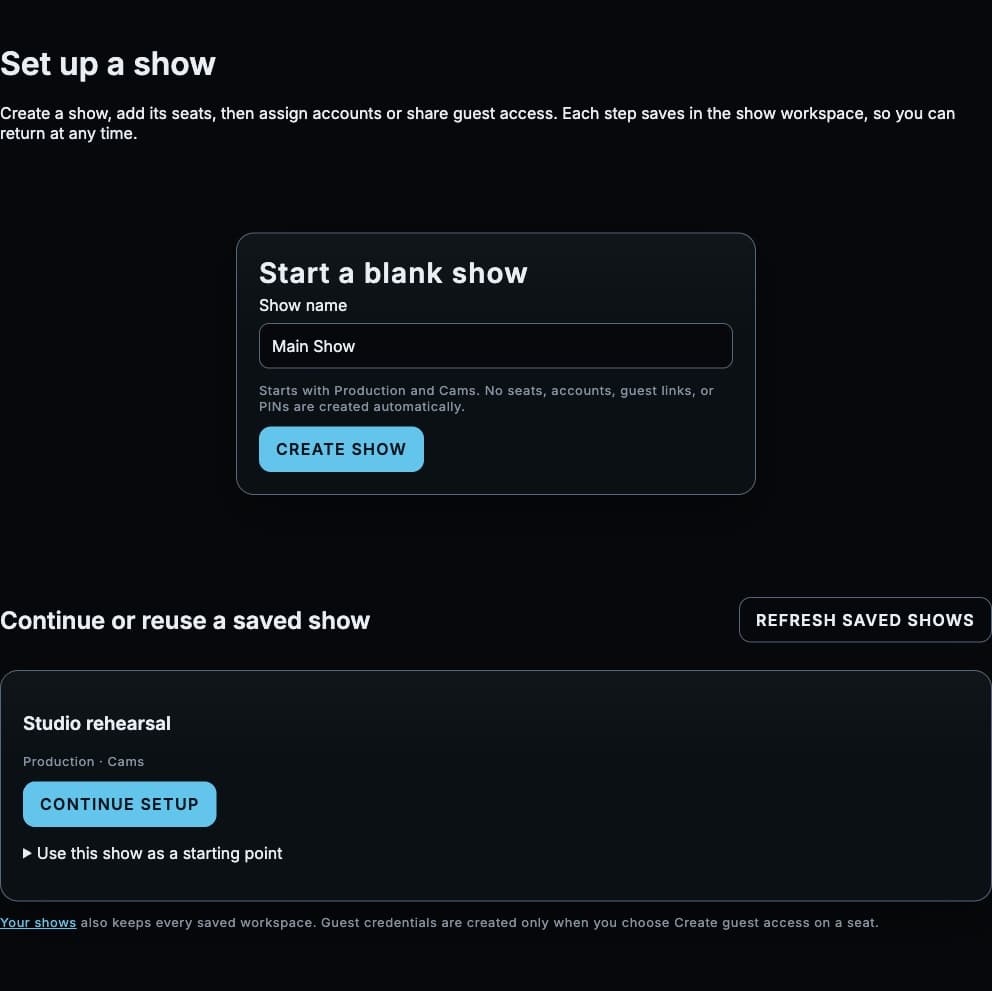
Name it. A new show opens on Production and Cams. Setup walks through the crew and your seat, then Open the line. A Stream Deck is optional after that.
- 02Hand out seats
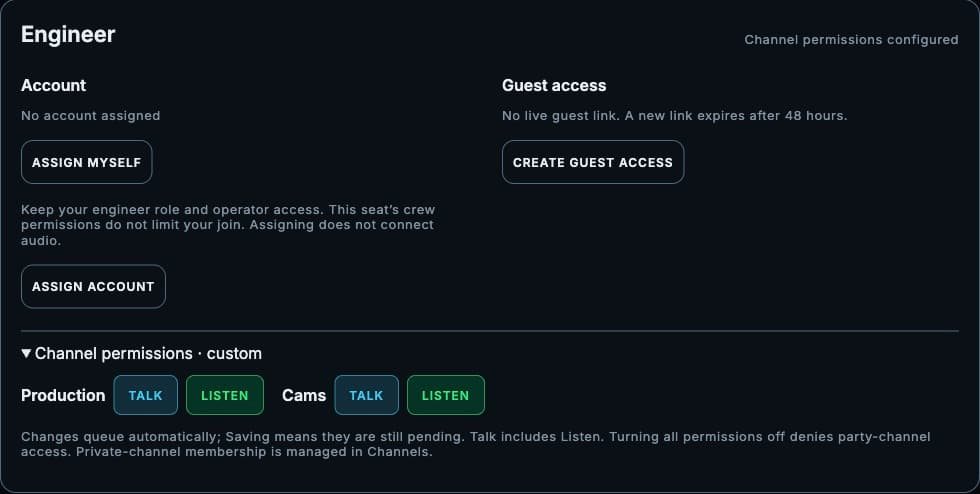
From Add crew on the show, type their email and a seat. They sign in once. One login covers every show they are on. A link or PIN is for a one-off.
- 03Press Talk
Tap to latch. Hold when you only need a beat. Call lights that channel. Reply shows on the other seats that can talk back.
The panel
A strip the booth already understands.
Each channel is a row of square keys: Talk, Listen, and Call, plus a listen level. A listen-only assignment has no Talk key. Listen off is labeled Off.
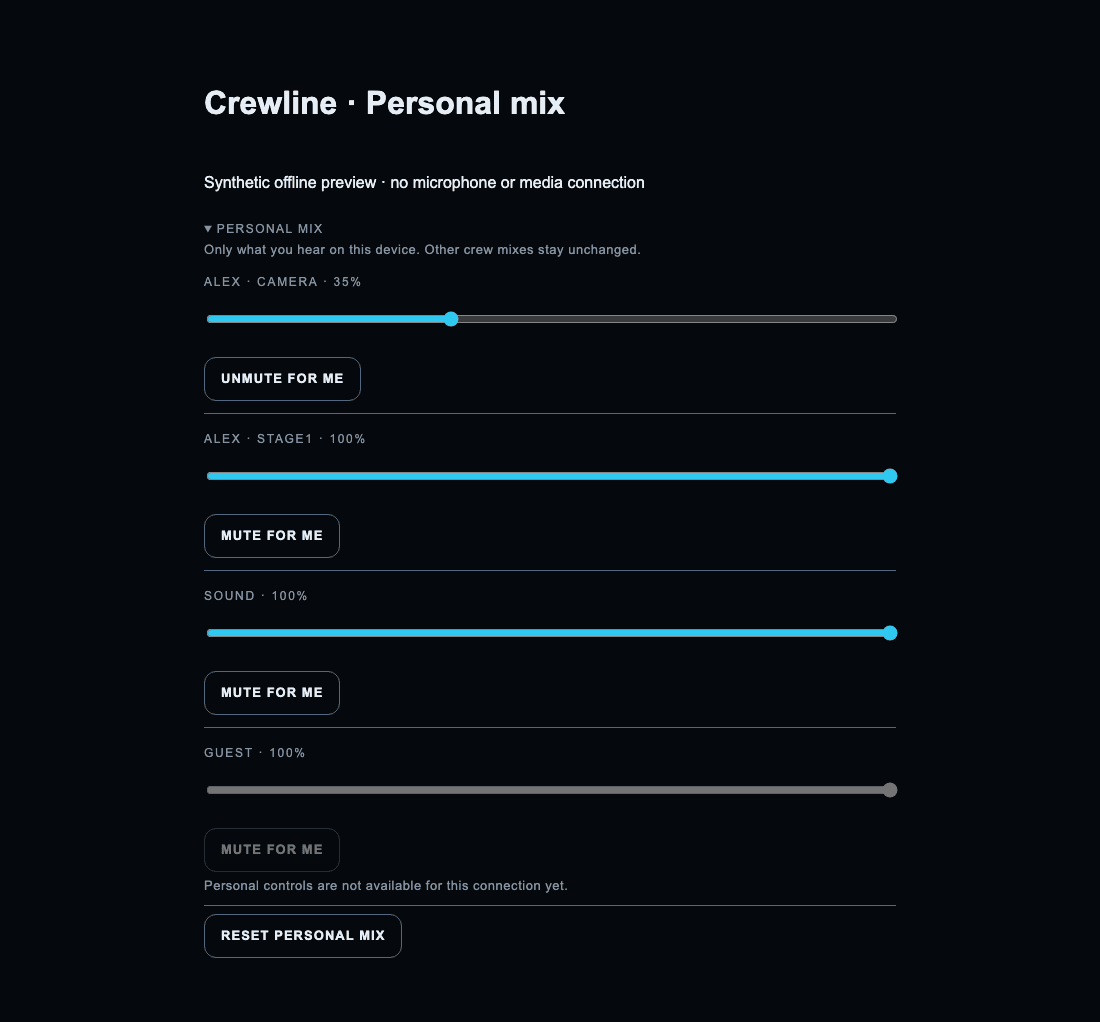
On the line
What is on the panel today.
On the ops matrix, a Talk assignment includes Listen. Operators keep every channel.
Program is a feed that dims while Talk or PAGE is open. The dim amount sits on that wedge.
PAGE latches Talk on every channel that seat can speak on. Priority duck lowers the listen level for seats that are not paging.
Call lights that channel. Reply shows on every other seat that can talk there and holds Talk back to the caller. The caller does not see Reply. A listen-only seat does not either. Reply leaves when the Call clears.
Those are the channels a new show opens with. An operator can rename a channel from the strip.
Save the channels, the talk and listen matrix, tally seats, and the Companion page. Load that profile back.
Create the show, add the crew, check your seat, then open the line. Adding a Stream Deck is optional on that last step.
Crew accounts are free. They sign in once and land on Your shows, including shows from other organizations that invited them. Add crew on the show puts them on a seat such as Cam 1. Removing them drops that show immediately. A guest link or PIN is for a one-off. Crew cannot create shows, open ops, or change billing.
The panel says Joining… while it connects, and Reconnecting… when the media link is coming back.
Crew accounts are free. Engineers start on Free. No card needed. Yearly billing is about two months free.
Assign Talk and Listen per person and per channel. Empty means that person is open on the party channels.
Bitfocus Companion
A keypanel on the Stream Deck.
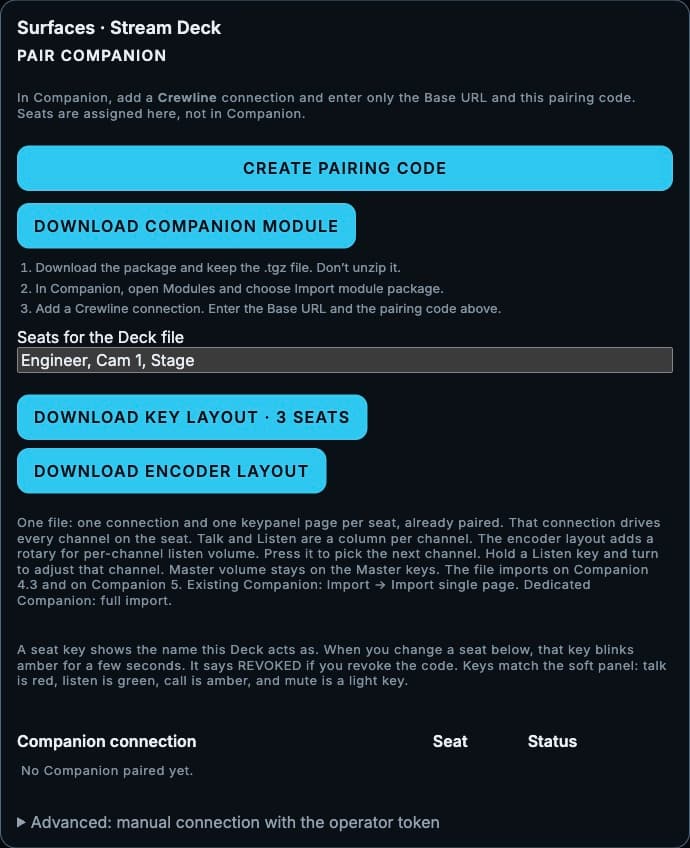
Download the Crewline module from Ops → Surfaces and import the package into Companion 4.3 or newer. Each channel has a Talk key and a Listen key. Tap Talk to latch. Hold it when you only need a moment. Mute lights and leaves latched talks in place. Volume keys step one channel or the master. On a Stream Deck + or Studio, turn the encoder for the master. Hold a channel’s Listen key and turn to change only that channel. The keys use the same colors as the soft panel.
Pair with a code from Ops. Seats are assigned in the browser. The soft panel still joins once. The deck runs the keys.
Built for a show
A room that never had copper.
Crewline is a show intercom for the operator and the crew. A broadcast booth, a corporate event, or a church can run the same panel, with no party-line frame in the rack.
- Run show setup before doors. Name the show, add the crew, check your seat, and open the line.
- Reuse the last show when the next one has the same channels and seats. Saved shows stay in the library. A plan limits how many shows can be live at once.
- Crew accounts are free. They sign in once. Your shows lists every show they are on. A guest link or PIN covers a one-off. Headphones on. No beltpack to hand out.
Where the audio goes
The web app is not the intercom.
Joining asks Crewline for a credential. The browser then connects to a LiveKit media server. Speech travels on that path. It does not pass through the Crewline web server.
A room that is already up stays up if a token refresh fails. The panel shows Joining… while the first connection is in progress, and Reconnecting… if the media link itself has to come back. A notice says “Back on the line” when that link returns.
Coming
On the bench. Not in this release.
A phone today uses the soft panel in the browser, including Add to Home Screen. A native iOS app is not shipping yet.
A Crewline adapter for 4-pin and 5-pin broadcast headsets is specced. It is not a product you can order.
Bridging into house copper, and a local path if the building loses its outside connection, are later. They are not claimed as ready.
Plans
Plans. Start on Free.
Crew accounts are free. The plan below is the engineer's. A person invited onto a show does not need a paid plan and does not count as a paid seat. Start on Free. No card needed. Yearly prices are on the card. Starter and up include up to 24 channels. Program feed is Starter and up. Bridging is Pro and up.
- 4 seats
- 2 party channels
- 1 show live at a time
- 1:1 calls and Call / Reply
- 1,000 minutes a month
- Companion included
- 10 seats
- Up to 24 channels
- 1 show live at a time
- 1:1 calls and Call / Reply
- Program feed
- 50,000 minutes a month
- Companion included
- 25 seats
- Up to 24 channels
- 1 show live at a time
- 1:1 calls and Call / Reply
- Program feed
- Private group lines
- Bridging for Clear-Com, Hollyland, Dante, 2-wire, and 4-wire
- 150,000 minutes a month
- Companion included
- 50 seats
- Up to 24 channels
- 3 shows live at a time
- 1:1 calls and Call / Reply
- Program feed
- Private group lines
- Bridging for Clear-Com, Hollyland, Dante, 2-wire, and 4-wire
- Priority support
- 300,000 minutes a month
- Companion included
- Custom seats, shows, and bridges
- Up to 24 channels
- Program feed
- Private group lines
- Bridging included
- Contact us
Companion, 1:1 calls, and Call / Reply are on every plan, including Free. Program feed is Starter and up. Private group lines and bridging to Clear-Com, Hollyland, Dante, 2-wire, and 4-wire start on Pro. Nothing is charged here.
FAQ
Before the first show.
Is this a voice-chat app?
Crewline is a production intercom: channel strips, Talk and Listen, Call, and an operator desk. It is built for a booth.
Do we need beltpacks or a copper party line?
Not for the soft panel. A browser and headphones are enough. Crew sign in. A one-off can use a guest link or PIN. House frames and headset adapters are on the coming list.
Where does the audio go?
To a LiveKit media server, from the browser. The Crewline site mints the join and then stays off that path.
What if the website has a hiccup after we have joined?
A failed refresh leaves the room that is already connected alone. If the media link drops, the panel says Reconnecting….
What does Free include?
Free · 4 seats · 2 party channels · one live show · Companion included. 1,000 minutes a month. No card needed. A new Free show opens on Production. Pro and Production add private group lines and bridging to Clear-Com, Hollyland, Dante, 2-wire, and 4-wire.
Can we drive it from a Stream Deck?
Yes. From Ops → Surfaces, download the Crewline module and import it into Companion 4.3 or newer. Pair with the code. The page is a Talk key and a Listen key for each channel.
How does the crew sign in?
Once, with email and password. Crew accounts are free. Your shows lists every show an engineer assigned, including other organizations. Taking someone off a seat drops that show right away. Their other shows stay. A guest link or a PIN is for someone who is not on an account. Crew cannot create a show, open ops, or change billing.
Does a phone work?
Yes. The soft panel runs in a phone browser. A native iOS beltpack app is listed under Coming.
Open a show
Put the panel in the booth this week.
Free · 4 seats · 2 party channels · one live show · Companion included. No card needed.